
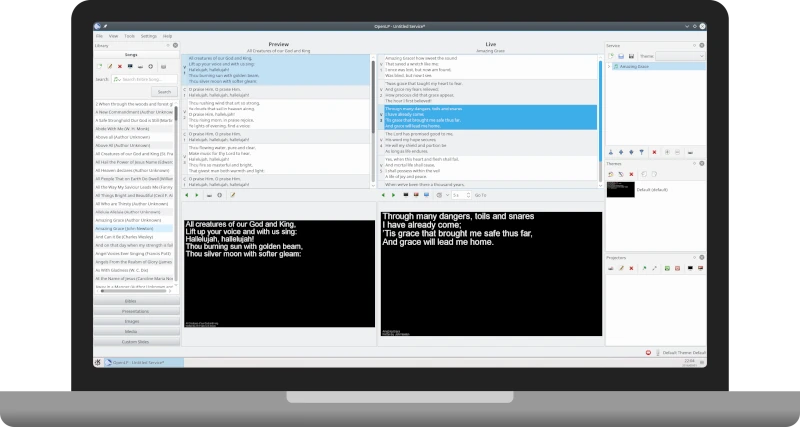
If you're looking for a professional alternative to PowerPoint for your congregation, but your budget is limited, OpenLP is the definitive answer. Unlike conventional office tools, OpenLP has been designed by and for churches, understanding the dynamic flow of a worship service. Among the programs for projecting Christian song lyrics, OpenLP is the free favorite: live lyrics over videos or backgrounds, Bible verses, dual screen, and mobile control.
What makes OpenLP different?
Most generic presentation software falls short on flexibility. OpenLP solves this through a database management system instead of static slides. This means you don't "create" a presentation from scratch every Sunday; you simply "build" a service by dragging and dropping preexisting elements.
🛠 Advanced Technical Features
Beyond what you already know, here are key features that often go unnoticed:
- VLC Media Player integration: OpenLP uses the VLC engine for video playback, which guarantees compatibility with almost any file format (MP4, MKV, AVI) without codec errors.
- Stage Display Management: You can configure a specific monitor output for the musicians on stage, showing only the current and next lyrics, along with rehearsal notes or an internal clock.
- Mass Import (The Importer Wizard): If you come from ProPresenter, OpenSong, or SongBeamer, OpenLP includes a wizard that migrates your entire song library in minutes, avoiding the tedious “copy and paste.”
- On-Screen Message Broadcasting: It allows you to send quick alerts over the projection (e.g., “Parents of child with tag #42, please come to the nursery”) without interrupting the visual background.
Comparative Analysis: OpenLP vs. Paid Software
For an informed decision, it is vital to know where OpenLP stands against giants like ProPresenter or MediaShout.
| Feature | OpenLP | Pro Software (Paid) |
| Cost | $0 (GPLv2 License) | $400 – $1,000+ |
| Bible Support | Unlimited (via Sword/CSV) | Often charge per version |
| Multi-platform | Windows, Mac, Linux, FreeBSD | Usually only Win/Mac |
| Visual Effects | Basic Transitions | Complex video layers |
| Learning Curve | Medium | Medium-High |
Digging Deeper into the “Drawbacks”: Is It for You?
Although it is powerful, OpenLP has nuances you should consider before installation:
- Interface Aesthetics: Its design is functional and clean, but it doesn't have the “look” of modern subscription applications.
- Screen Setup: Because it relies on the operating system's extended display settings, the initial setup can be confusing for non-technical users.
- Text Animations: If you're looking for song lyrics to have "cinematic" entrance effects, OpenLP is more understated; it focuses on readability and stability.
Tips for a Successful Setup
To make your installation even more useful, you can add these practical steps:
- Step 1: Prepare the Bibles. Download files in Sword o OpenSong format to have multiple versions (Reina Valera 1960, NIV, etc.) ready to project.
- Step 2: The Local Network. To use the remote control from your phone, make sure the PC and the mobile device are on the same Wi-Fi network.
- Step 3: Video Backgrounds. Use looping videos (motion backgrounds) with low graphic load to keep the system running smoothly.
Verdict: OpenLP is the ideal tool for churches that prioritize efficient content management and the freedom of open-source software over high-cost visual effects.
Resources and Download
- Official Website: openlp.org
- Spanish Community: There is a growing body of documentation and forums where users share themes and pre-formatted Bibles.
Did you find this article helpful? Mark us as your preferred source on Google and get our content first.