
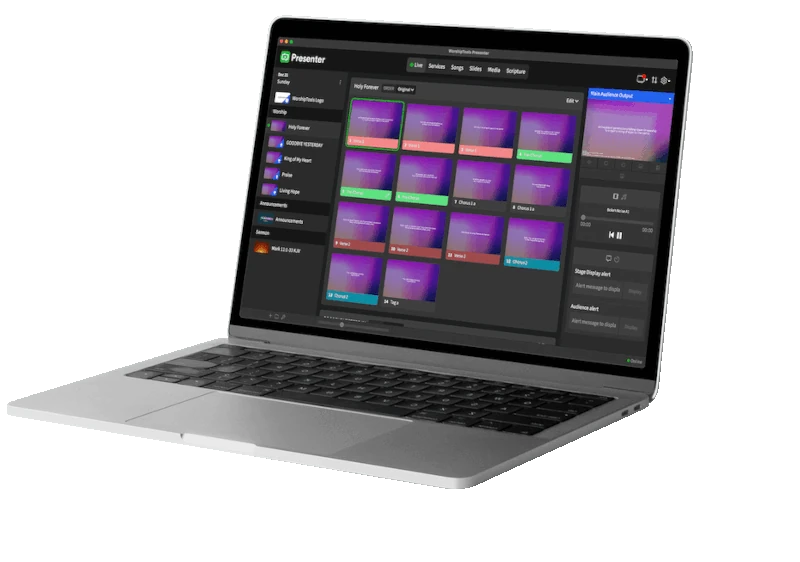
If your congregation is looking for a modern solution that eliminates the jump between different standalone programs, WorshipTools it represents the perfect balance between power and ease of use. Unlike tools that require complex servers, this suite works as a modular cloud-based ecosystem that unifies administration, planning, and projection.
What makes WorshipTools different?
The great advantage of this ecosystem is instant synchronization. What the worship leader organizes in the Planning module from home automatically appears in the church's Presenter projection software. There's no need to transfer files via USB or recreate song lists on Sunday morning.
🛠 Advanced Technical Features
Beneath its friendly interface, the suite hides professional-grade tools:
- Multi-Screen Projection Engine: Presenter supports multiple independent outputs, allowing lyrics to be sent to the main screens, a "stage" layout (Stage Display) for the musicians, and Lower Thirds (lower thirds) for the live stream.
- Chord Chart Automation: The Music Charts module lets you transpose the key of any song instantly; the digital sheet music for all the musicians updates in real time on their tablets.
- Cloud Workflow Management: Because it is based on the user account, you can manage volunteer roles, participation approvals, and service schedules from any device with internet access.
- Database Integration: The Community centralizes attendance history and contact information, linking Sunday activity with the membership record.
Comparative Analysis: WorshipTools vs. OpenLP / Rock RMS
To understand its position in the market, it is necessary to compare it with the options previously analyzed.
| Feature | WorshipTools | OpenLP | Rock RMS |
| Installation | Plug & Play (Cloud) | Local (PC) | Server (Windows/SQL) |
| Learning Curve | Very Low | Medium | High |
| Synchronization | Automatic in the cloud | Manual | Centralized on server |
| Cost | Freemium (Free Basic) | $0 (Open Source) | $0 (Open Source) |
| Specialty | Modular Ecosystem | Pure Projection | Comprehensive Management |
Digging Deeper into the “Drawbacks”: Is It for You?
Despite its versatility, there are factors that must be carefully evaluated:
- Internet Dependency: Since it is a cloud-based tool for synchronization, an unstable connection during the preparation phase can be an obstacle (although the projection software works offline once the service has been downloaded).
- Freemium Model: Unlike OpenLP, some advanced aesthetic features or mass storage require a subscription, which can generate recurring costs if the church grows significantly.
- Development Community: Since it is proprietary software (not open source), you cannot modify the code for custom features as you would in Rock RMS.
Tips for a Successful Setup
To get the most out of the suite from day one, follow these steps:
- Step 1: Centralize the main account. Create an institutional account for the church and from there invite the leaders as “Editors” so that each one manages their area (Worship, Media, Administration).
- Step 2: Set up the Stage Display. If you have an extra video output, use stage mode so that preachers and musicians can see the remaining service time and private notes.
- Step 3: Download Mobile Apps. Make sure the musicians install WorshipTools Charts to eliminate paper folders and improve rehearsal dynamics.
Verdict: It is the ideal option for churches that value mobility, quick implementation, and a modern aesthetic without needing a technical team specialized in programming.
Access and Resources
- Official Website: worshiptools.com/es-us
- Support: They offer video tutorials and a very comprehensive knowledge base for each module.
Did you find this article helpful? Mark us as your preferred source on Google and get our content first.